Do you manage a project that involves multiple interdependent tasks, some of which overlap and need to progress at the same time? That’s precisely why the Gantt chart was developed.
Even if you’re not familiar with the name, you’ve probably seen one before. As Dan Roam writes in his book The Back of the Napkin, “the Gantt chart is often considered one of the most important project management breakthroughs of the 20th century.”
In this post, I’ll outline the steps involved in sketching one out by hand, and then share some specific applications of this chart that you probably haven’t seen before.
How to Sketch a Gantt Chart
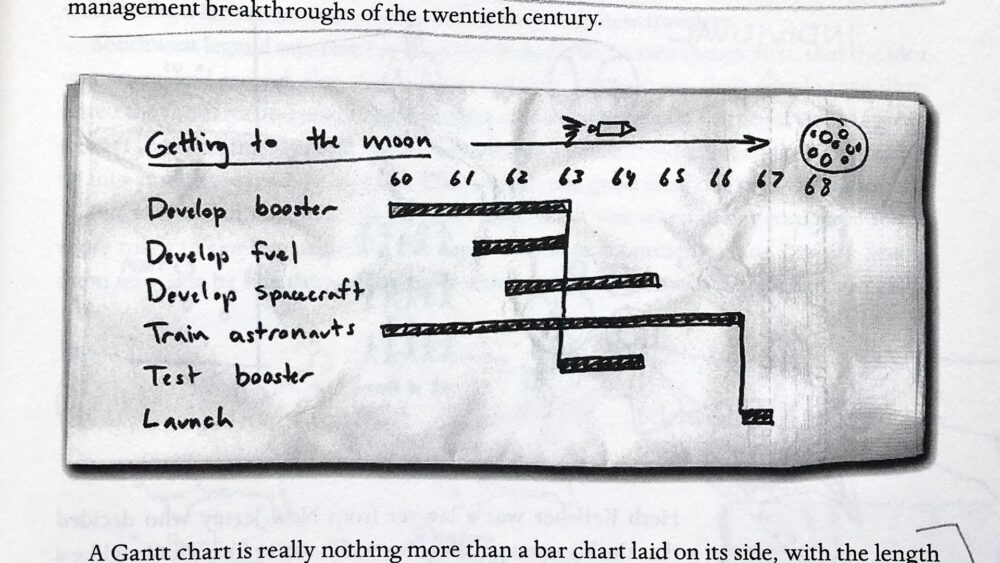
Let’s start with the example Roam shares in The Back of the Napkin: NASA’s effort to get to the moon in the 1960s.

I like to think of a Gantt chart as a mix between a bar chart and a timeline. What makes it useful is that you can map out the progression of multiple tasks over time, noting when one task depends on the completion of another.
Here are the steps, using that moon-landing example:
- Identify the specific tasks involved in your project. List them out vertically. In this example, that includes developing the booster, the fuel, and the spacecraft; training the astronauts; testing the booster; and finally, launching.
- Set the timeline. Plot it out horizontally across the top of the chart. For this chart, a year-by-year scale throughout the 1960s makes sense.
- Chart the estimated duration of each task. This is where you draw the bars, each spanning the amount of time you think a task will take. One helpful thing about this approach is that you can see where there’s overlap: the times when you and your team need to be making progress on multiple tasks at once. That can help you decide how best to allocate resources.
- Identify dependencies. Note the places where the start of one task depends on reaching a particular milestone in another, and mark those dependencies with vertical lines. For example, before you can test the booster, you first have to develop it, along with the fuel that will power it. And in order to launch, you of course need to complete all of the previous tasks.
A hand-sketched Gantt chart like this gives you a helpful big-picture overview of a project that has many components, some of which depend on each other and many of which need to progress at the same time.
Once you get into the nitty-gritty of a project, especially one that’s likely to evolve over time, you might want to transition from a hand-sketched Gantt chart to one built in a software program designed to handle regular changes and updates. That’s what Abby Covert suggests in her book Stuck? Diagrams Help., which also addresses Gantt charts.
Here, though, we’ll stick with the hand-sketched approach, and take this chart to some potentially new places. Both of the next examples came up during live sessions inside Verbal to Visual.
Example: Mapping Your Network Self
A few years ago, I encouraged workshop participants to reflect on the past few months and make some plans for the months ahead.
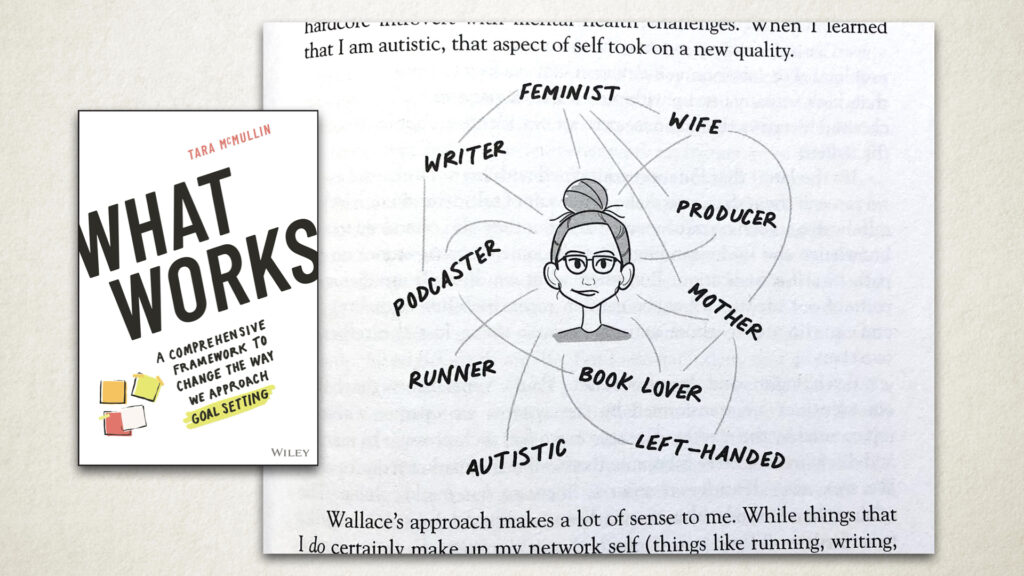
We started with an idea from Tara McMullin’s book What Works called the network self. You list out your various identities to remind yourself that you are more than just one thing. Then you look for connections between those identities, and perhaps decide which ones you want to lean into in the coming weeks or months.
After that reflection activity, I asked participants to use a Gantt chart to map out the specific projects they’d be working on over the next month or two, identifying both the sequencing of those projects and any potential overlap.
I had imagined those two activities as separate, with the first simply informing the second. But one community member, Julie, decided to blend them. Instead of using the Gantt chart to list out multiple projects, or the variety of tasks within a single project, she listed out her various identities and noted when each one would be taking center stage in the coming weeks.

I found that to be a very useful way of seeing how you’re investing your time and energy across your identities: where connections can be made between them, and which of them might be neglected and could benefit from some extra attention.
Free guide: If you’re intrigued by this process of sketching out ideas, and not just thinking about them or writing them down, you might enjoy Getting Started with Sketchnoting. It includes the introduction and first 18 practice activities from The Verbal to Visual Notebook, designed to get you back to making marks by hand. You did it as a kid, and you can do it again as an adult.
Example: Caring for an Aging Parent
The next example came up in a more recent workshop, and it added a fifth step: assigning roles to specific tasks at specific stages.
The project in this case wasn’t related to work or to exploring your network self. Instead, it was about caring for an aging parent, and how the workshop participant and her two siblings could best do that. Let’s imagine this scenario and work through all five steps.
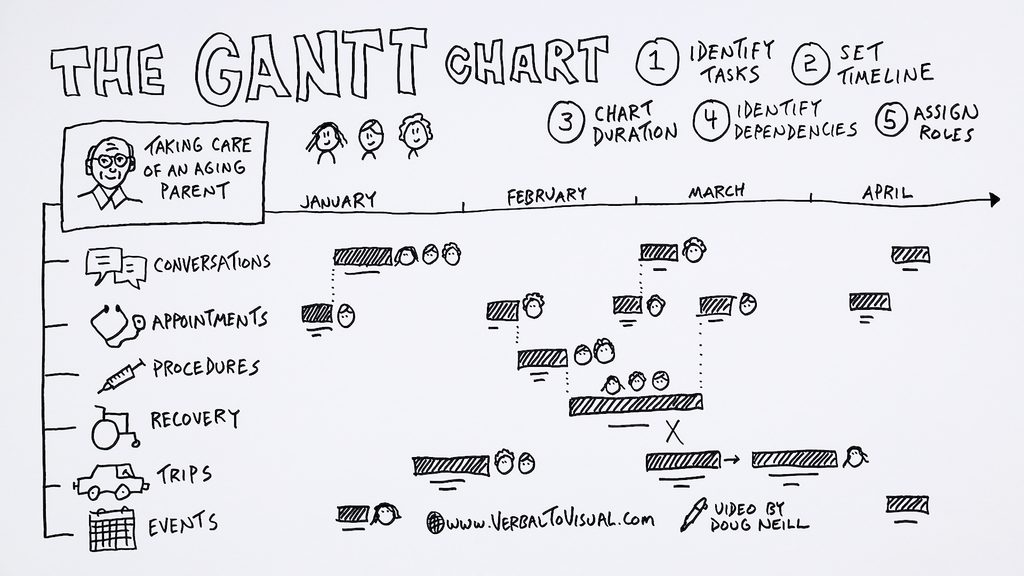
- Identify the tasks. These include having important conversations, going to appointments, having procedures when necessary, periods of recovery, trips that take someone out of town, and any other events that might be taking place.
- Set the timeline. Let’s imagine a four-month period from January through April. The goal is to use this chart to keep the three siblings and their parent on the same page as they manage the various care responsibilities in the coming months.
- Chart the durations. Map out when appointments are coming up, the conversations that need to happen after those appointments, other events and trips, when specific procedures take place, and the estimated period of recovery.
- Identify dependencies. Some become clear right away: between appointments and conversations, and between procedures and recovery periods. Maybe a trip that was scheduled a while back ends up landing during a recovery period, and you need to shift it a few weeks into the future. This is where the blend of bar chart and timeline becomes powerful, because you can see where overlap exists and where you might need to create more space.
- Assign roles. For these three siblings, it helps to note who will join their parent for which appointments or events, who should take part in those important conversations, who will be there for the procedure, who will support the recovery, and so on.
If you sketch all of this out on a large enough piece of paper, you can use the extra white space to make notes related to everything that’s going on.
Try It Yourself
Whether it’s a big collaborative project you’re taking on with a team, some personal reflection and planning around how you’d like to spend your time, or a conversation with family members about taking care of each other, the Gantt chart is a useful visual thinking tool. It helps you plan out the various parts of a project, identify the important areas of overlap and dependency, and then track your progress as you move through that time period.
Now that you’ve seen the Gantt chart in action with three specific examples, it’s your turn. Consider whether a current project of yours would benefit from this type of planning. Here are a few ideas to get you started:
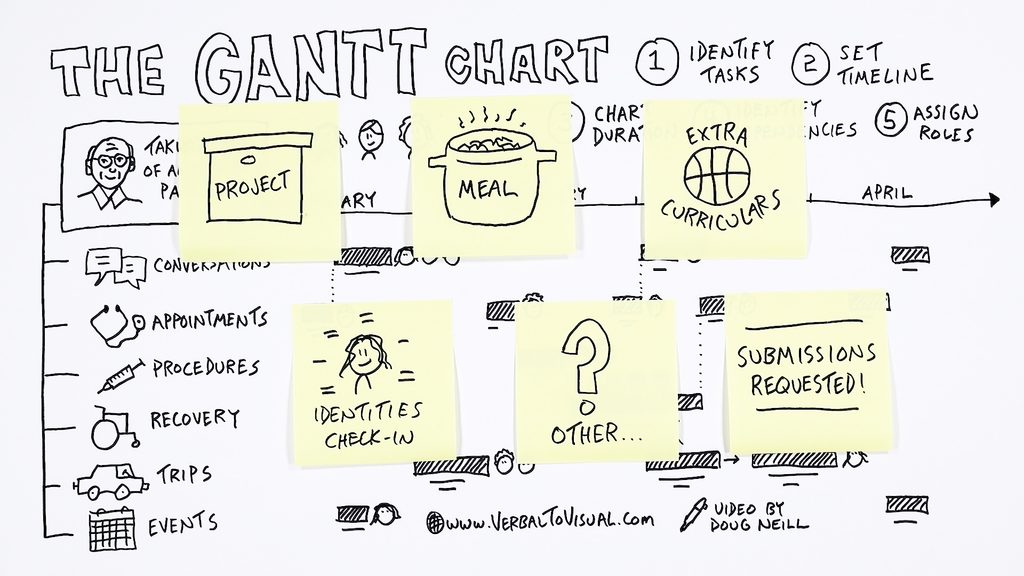
- Map out a complex meal. As Abby Covert suggests in Stuck? Diagrams Help., try a meal with multiple steps, where different things need to be cooking at the same time.
- Track your kids’ activities. If you have multiple kids, use a Gantt chart to keep track of their extracurricular activities and which parent or caretaker is getting them to and from each one.
- Check in on your network self. If you’re in a period of transition, list out your various identities, then map out what you’d like to lean into in the future.
Or maybe you have another idea for how this visual thinking tool could be useful in your life.
Share Your Gantt Chart
If you take on the challenge of creating your own Gantt chart, I’d love to see it, and I’d love to feature it in a future video so we can see even more examples of this tool in practice. I’ll be accepting submissions inside Verbal to Visual.
If you’re already a member, follow this link to share your chart. If you’re not yet a member, check out our library of courses to help you develop your visual thinking skills:

- An Introduction to Visual Note-Taking is a great option if you’re just getting started.
- Make Models is for those a little further along, especially if you’re using visual thinking as a communication tool.
- Digital Sketchnoting is for anyone using a tablet and stylus.
- Sketchnoting in the Classroom is for teachers and parents who want to share this skill with their students.
Membership gets you into our online learning environment, where you can share your work and participate in challenges like this one. I look forward to seeing what you make!
Cheers,
-Doug